
New: part of the Decision Suite

Document generation for Dataverse and Dynamics 365: rendered inside your tenant.

Pixel-perfect PDFs today: Swift AI drafts the template, you finish it in the designer. Word data merge for negotiated contracts next. No external service, no server to host, no data round trips.
One product. Every document.

Fixed-layout PDFs and negotiated Word documents, each authored in the tool that suits it, both stored in your solution.

The PDF engine

Available now

Renders fixed-layout, print-final documents: invoices, quotes, statements, certificates, reports, letters.

Templates built with AI and edited in the native drag-and-drop designer.

The Word engine

Coming soon

Merges Dataverse data into real .docx for negotiated, long-form documents: contracts, agreements, bespoke proposals.

Templates authored in Word itself, via the add-in, saved straight to your solution.

Which engine do I need?

It depends on one thing: what happens to the document after generation?

Choose your outcome:

The PDF engineAvailable now

Renders fixed-layout, print-final documents.

Request a demo

Start with AI. Finish in the designer.

Swift AI gets a template about 95% of the way. The designer is for the last 5%.

  1. 1. Describe it, or bring one you use

    Say what the document needs to say and show, or upload a template you already send today.

  2. 2. Swift AI drafts the template

    It comes back laid out, with the fields bound to your data and the tables already in place.

  3. 3. You take it the rest of the way

    Open it in the designer and adjust whatever you want: spacing, styling, a total, a conditional rule.
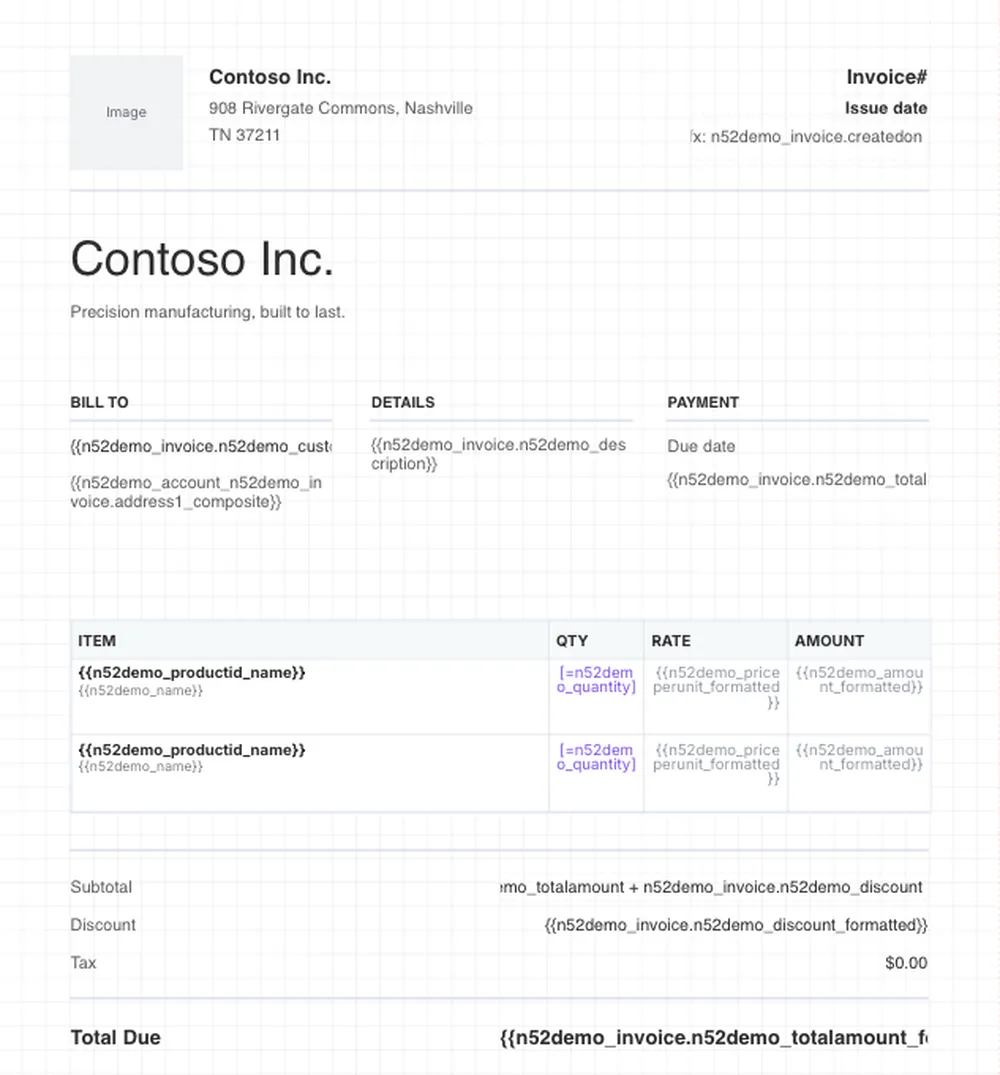
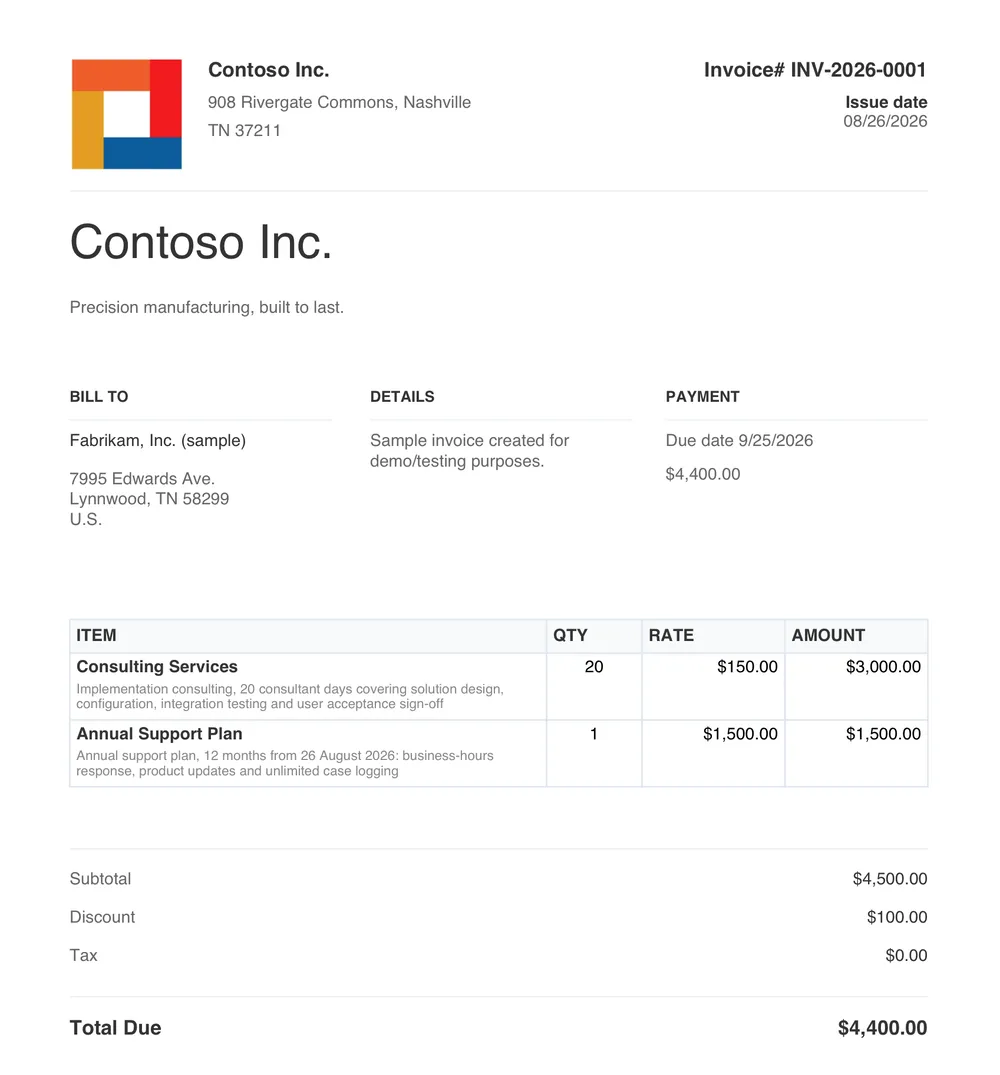
The same invoice rebuilt as a SwiftReports template. The layout and branding are identical and the two line item rows line up with the invoice beside it, but every value is replaced by the Dataverse field it binds to, such as the customer name, the line item quantity and the invoice total.
An invoice from Contoso Inc. to Fabrikam, numbered INV-2026-0001, with two priced line items, consulting services and an annual support plan, and a total due of $4,400.00.

The invoice you send todayRebuilt as a SwiftReports template

Drag to compare. The same invoice, rebuilt as a template using AI, ready for finishing touches, with your Dataverse fields bound in place of the values.

Already have a template?

Send it to us and we'll rebuild it for you, free.

Get a free template rebuild

What you finish it with

A drag-and-drop designer, inside Dataverse.

Visual template designer

Drag and drop elements onto the page, with rulers, snap-to-grid and positioning in millimetres. What you lay out is what the PDF looks like.

Data binding you can read

Bind any field with Handlebars syntax, {{contact.firstname}}, and walk related records with dot notation. Default values keep a document tidy when a field is empty.

Dynamic tables and calculated fields

Line items populate themselves. Totals, subtotals and tax come from aggregate functions like SUM, AVG and COUNT, formatted as currency, percentages or plain numbers.

Conditional formatting

Show, hide and style elements on the data. Flag an overdue invoice, suppress a section with nothing in it, or restyle a row based on what the record says.

Headers, footers and backgrounds

Page numbers, dates and logos carried across every page, plus watermarks such as DRAFT or CONFIDENTIAL with their own opacity and rotation.

Snapshots

Save a template state before you change it, compare designs side by side, and revert instantly when an experiment does not land.

Generate from anywhere you already work

A button on a form, a step in a flow, or an agent asking for it. The same templates behind all three.

Dynamics 365
Sales, Customer Service, Field Service and any other model-driven app.
Power Platform
Dataverse, Power Apps, Power Pages and Power Automate.
Copilot Studio
Agents generate documents as part of what they do, on the same rules as everything else. How agents use North52 →

The comparison

Where your templates live, and where the rendering happens.

The usual approach

  • Templates managed through vendor portals and side-car tools
  • Generated on a server somewhere else: theirs in the cloud, or yours to host
  • Your data makes a round trip
  • Your templates sit outside your ALM

SwiftReports

  • Templates are solution components, versioned and deployed dev to test to prod through your existing pipelines
  • Merged and rendered in Dataverse
  • Nothing leaves, nothing extra to host

See sample documents

The template as it looks in the designer, and the PDF it produces. Both are real, and both are yours to download.

Included, or on its own

SwiftReports comes with Business Process Activities, the North52 rules engine. If document generation is all you need, it is available standalone. See the editions →

See your documents rendered from your data.